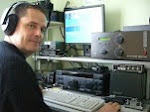
My favourite mode is CW. I was asked during a foundation course why CW was so good, and in the following discussion it became apparent that there is an enormous gap in education about what it's like to operate in CW after you've learnt the morse code. Here is my attempt to hopefully inspire more Hams to give it a go.
I've always thought that learning morse code is like learning to ski. At the start it isn't much fun, you look at how effortless everyone else seems to find it, and you wonder if you will ever get to that level. You can see others enjoying themselves, but it seems impossible to get a rythm going at the speeds you are forced to go at. You make lots of mistakes and the effort necessary to complete one run just doesn't seem worth it.
I'm teaching my five year old how to read at the moment and the books she is learning from just aren't that exciting due to language restrictions. TV to her is just so much more accessible, reading simple stories about Dick and Jane just doesn't hack it in comparison. I've tried to tell her that when you read a real book you can let your imagination run riot and suddenly you are there in technicolor. When the film comes out it's never as good as the way you had imagined it.
It's no lie to say that the effort required to ski or to read is immense, neither can be learnt over night. It's only through watching and listening to others that we can tell that learning how to do them is worth the effort.
I think part of the joy of the cw mode is from the fact that it was such a hard won skill. The other part is when you start to realise the added benifits that this new mode brings you.
1) Less background noise.
CW is a narrow bandwidth mode and as such you can reduce the passband of your receiver (using narrow filters) which causes the background noise to fall from the comparitive raging static required for voice mode communication to a quiet, easy listening hiss.
2) More space within the allocation.
You can fit in at least 10 CW stations in the same bandwidth required for 1 SSB station. Imagine having an SSB band allocation increased by a factor of 10. There would be much more room for everyone, meaning more chance of getting that crystal clear frequency on a wide open band to catch that elusive DX. This is the norm in CW mode.
3) More discernable signals.
A CW signal can be copied easily against this hiss and way down into the hiss unlike that of any voice mode. In voice modes, when a weak signal is heard, it is normal to only be able to hear the 'peaks' of the other stations voice, enough to know that they are there, but not enough to understand what they are saying. In the CW mode, each morse code element sent is a 'peak' so in the above case 100% copy is achievable. This is due to the on/off nature of the morse code against the large range of sounds possible in voice modes. It is therefore possible to extend the range of reliable communications that your setup is capable of.
4) Less QRM.
The on/off nature of the morse code allows the receiver to be open/active during off periods of transmission. This allows the sender to partially hear 'through' their own transmission. The advantages of this are many but imagine calling in on a pile-up and being able to tell that continued transmisson was pointless as the DX was now sending back to someone else.
5) Cheaper Equipment
The circuits involved in the creation of a CW transceiver are very much simpler with less components than that of any transceiver with voice capabilities. This allows for easier home construction, less battery current comsumption, smaller more portable transceivers and ultimately therefore cheaper to buy. You can buy a brand new CW transceiver kit for £25.
The above points are only some of the many benefits that make this mode of communication such a joy. All of the above allow more DX to be worked, but the joy of the CW mode goes further than this. Following the reading/TV analogy made earlier, some people find that during a cw conversation your imagination is on full throttle and is filling your mind with clear pictures on the topic allowing you your own version of what the other station is communicating.
I hope that this added information may help inspire someone out there to go that extra mile and make the extra effort learn the morse code.
Sunday, 21 December 2008

Saturday, 20 December 2008
SDMO Booster 1000 petrol suitcase generator
I took advantage of a Christmas offer from Screwfix, £100 off if you spend over £450. The generator was listed at £460 so got it for £360, still a lot of money but I'm hoping it will be perfect for portable operations in the summer. It was delivered the next day (great service) and came with oil, spark plug removal tool and battery charging leads.
I topped up the oil, filled it with fuel and started her up. The noise from it is too loud to have it next to the operating position, but walking about 10m away from it dropped the noise to a level that couldn't be heard through a mic. I recon I could run it at the house without bothering my immediate neighbours.
I plugged a power supply into the mains socket on the side of the generator and connected a rig and dummy load. I scanned 1.8 to 30MHz and found no birdies within the amateur bands, the receiver sounded clean and clear.
The transceiver pulls about 20A at 12V at maximum power output of 100W. With the generator on it's 'turtle' (slow rev) position an indicator lamp lights if you exceed it's current capabilities to warn you to switch it to 'hare' (fast rev) position. Whilst looking at this warning lamp I slowly increased the power output of the transceiver whilst transmiting. I could get the full 100W from the rig without having to change up to the louder, faster rev position.
I have a 110A/H leisure battery and I had thought that if the generator couldn't handle the rig on it own, that I would connect the generator and the battery in parallel with the rig. Hopefully the battery will smooth the generated charging voltage sufficiently to allow this configuration. This will be my next test when I get time.
I topped up the oil, filled it with fuel and started her up. The noise from it is too loud to have it next to the operating position, but walking about 10m away from it dropped the noise to a level that couldn't be heard through a mic. I recon I could run it at the house without bothering my immediate neighbours.
I plugged a power supply into the mains socket on the side of the generator and connected a rig and dummy load. I scanned 1.8 to 30MHz and found no birdies within the amateur bands, the receiver sounded clean and clear.
The transceiver pulls about 20A at 12V at maximum power output of 100W. With the generator on it's 'turtle' (slow rev) position an indicator lamp lights if you exceed it's current capabilities to warn you to switch it to 'hare' (fast rev) position. Whilst looking at this warning lamp I slowly increased the power output of the transceiver whilst transmiting. I could get the full 100W from the rig without having to change up to the louder, faster rev position.
I have a 110A/H leisure battery and I had thought that if the generator couldn't handle the rig on it own, that I would connect the generator and the battery in parallel with the rig. Hopefully the battery will smooth the generated charging voltage sufficiently to allow this configuration. This will be my next test when I get time.
Monday, 1 December 2008
CQWW CW 08
Well I found it very difficult. The K3 and the K2 in either ear was easy at the start, but when I got tired it was a nightmare.


I can now see why a lot more automation is helpful for SO2R. Having to change the coaxial stubs over was confusing and tiring, but I didn't get it wrong (thank goodness). There were no knocks on the door this time so I continued through till the end of the contest. I probably got about 24 hrs in and enjoyed most of it.
Things that bugged me:
1) SO2R freq hogs, their not using it, but you can't have it!
2) Running a massive pile up of US stns on 40m only to get my RX obliterated by some non-contest station having a QSK QSO with 10KW and key clicks to match! I have no doubt it's propably the first QSO they've made in the whole year, just to hack contesters off.
3) Having my crystal clear freq stolen by a larger EU stn.
4) Trying to eek out that JA on 20m only to have constant hasstle from people tring to steal the freq because they can't hear the DX i.e. QRL? ? ? QRL etc.
5) Watching all the ridiculous cluster entries go by about LID, squeezing, stole freq etc. The best one was unfortunately from a G4 stn who was warning CW stns to stick to the bandplan. He obviously doesn't know CW covers the whole band in most cases.
Things that were brilliant:
1) Worked HC8N from 80-15m :-)
2) K3 receiver
3) K2 receiver
4) Spiderpole 40m vertical wire antenna
5) Massive pile ups!
The cobweb antenna was playing up due to the frost, I have the wrong string type on the antenna and when it froze up the SWR went sky high.

1) SO2R freq hogs, their not using it, but you can't have it!
2) Running a massive pile up of US stns on 40m only to get my RX obliterated by some non-contest station having a QSK QSO with 10KW and key clicks to match! I have no doubt it's propably the first QSO they've made in the whole year, just to hack contesters off.
3) Having my crystal clear freq stolen by a larger EU stn.
4) Trying to eek out that JA on 20m only to have constant hasstle from people tring to steal the freq because they can't hear the DX i.e. QRL? ? ? QRL etc.
5) Watching all the ridiculous cluster entries go by about LID, squeezing, stole freq etc. The best one was unfortunately from a G4 stn who was warning CW stns to stick to the bandplan. He obviously doesn't know CW covers the whole band in most cases.
Things that were brilliant:
1) Worked HC8N from 80-15m :-)
2) K3 receiver
3) K2 receiver
4) Spiderpole 40m vertical wire antenna
5) Massive pile ups!
The cobweb antenna was playing up due to the frost, I have the wrong string type on the antenna and when it froze up the SWR went sky high.

Contest : CQ World Wide DX Contest
Callsign : MM3T
Mode : CW
Category : Single Operator - Assisted (SOA)
Overlay : ---
Band(s) : All bands (AB)
Class : High Power (HP)
Zone/State/... : 14
Locator : IO75XR
Operating time : 23h12
BAND QSO CQ DXC DUP POINTS AVG
--------------------------------------
160 58 5 29 0 60 1.03
80 363 16 55 0 518 1.43
40 402 21 68 1 568 1.41
20 451 20 75 0 784 1.74
15 18 7 8 0 48 2.67
10 0 0 0 0 0 0.00
--------------------------------------
TOTAL 1292 69 235 1 1978 1.53
======================================
TOTAL SCORE : 601 312
Callsign : MM3T
Mode : CW
Category : Single Operator - Assisted (SOA)
Overlay : ---
Band(s) : All bands (AB)
Class : High Power (HP)
Zone/State/... : 14
Locator : IO75XR
Operating time : 23h12
BAND QSO CQ DXC DUP POINTS AVG
--------------------------------------
160 58 5 29 0 60 1.03
80 363 16 55 0 518 1.43
40 402 21 68 1 568 1.41
20 451 20 75 0 784 1.74
15 18 7 8 0 48 2.67
10 0 0 0 0 0 0.00
--------------------------------------
TOTAL 1292 69 235 1 1978 1.53
======================================
TOTAL SCORE : 601 312
Wednesday, 12 November 2008
K3 and K2 SO2R, Early days
I had the thought that before I purchased the K3 second receiver, I would experiment with SO2R using the K3 and the K2. I use WinTest contesting software and this has a dual logging/sending facility (SO2R) that allows 2 rigs to be connected. I had been under the impression that you needed one of those fancy SO2R boxes to get started, but soon realised that there are many different levels of automation in SO2R, from none to completely automated.
The one prerequisit as far as I'm concerned is to be able to hear both radios through 1 set of headphones. I did this with the following bits I had around the shack:
2x stereo headphone jack to two mono sockets
2x mono to stereo adapter
1x 3 way 3 pole switch box
The radios in their current configuration basically output 2 mono channels each. One on the tip and one on the ring of the headphone socket. I used 2x stereo to two mono splitter leads (available from maplin) to allow various combinations of audio at the input of the switch box:
1) Rig 1 tip to headphone tip, rig 2 tip to headphone ring.
2) Rig 1 ring to headphone tip and ring (using mono to stereo adapter).
3) Rig 2 ring to headphone tip and ring (using mono to stereo adapter).
With the headphone plugged into the output of the switch box, I can now select from the above combinations to hear the K3 in my left ear and the K2 in my right ear or the K3 in both ears or the K2 in both ears. I was worried about mixing the earth connections from the headphone sockets of both rigs but in practice this seemed to work fine.
To help prevent interaction between the radios when transmitting from one, I have cut 2x 23' coaxial stubs (one shorted and one open circuit). I have assigned the K3 to operate on 40/15m and the K2 to operate on 20/10m. A tee piece spur from the coaxial line from each rig provides the connection point for each stub. The shorted stub is connected to the k3 coax as it filters 20/10m and passes 40/15m. The open stub is connected to the K2 coax and it filters 40/15m and passes 20/10m. This will hopefully allow me to simultaneously run on one radio and S&P on the other without too much interference.
The one prerequisit as far as I'm concerned is to be able to hear both radios through 1 set of headphones. I did this with the following bits I had around the shack:
2x stereo headphone jack to two mono sockets
2x mono to stereo adapter
1x 3 way 3 pole switch box
The radios in their current configuration basically output 2 mono channels each. One on the tip and one on the ring of the headphone socket. I used 2x stereo to two mono splitter leads (available from maplin) to allow various combinations of audio at the input of the switch box:
1) Rig 1 tip to headphone tip, rig 2 tip to headphone ring.
2) Rig 1 ring to headphone tip and ring (using mono to stereo adapter).
3) Rig 2 ring to headphone tip and ring (using mono to stereo adapter).
With the headphone plugged into the output of the switch box, I can now select from the above combinations to hear the K3 in my left ear and the K2 in my right ear or the K3 in both ears or the K2 in both ears. I was worried about mixing the earth connections from the headphone sockets of both rigs but in practice this seemed to work fine.
To help prevent interaction between the radios when transmitting from one, I have cut 2x 23' coaxial stubs (one shorted and one open circuit). I have assigned the K3 to operate on 40/15m and the K2 to operate on 20/10m. A tee piece spur from the coaxial line from each rig provides the connection point for each stub. The shorted stub is connected to the k3 coax as it filters 20/10m and passes 40/15m. The open stub is connected to the K2 coax and it filters 40/15m and passes 20/10m. This will hopefully allow me to simultaneously run on one radio and S&P on the other without too much interference.
K2, Z10000-K2 buffer amp and SoftRock V6.2Lite
With the K3 panadapter being so successful, I decided to go back to Clifton Labs to see if they had a solution for my K2. The K2 doesn't have an IF out socket on the rear panel like the the K3, but luckily Clifton Labs sell a complete kit allowing the Z10000-K2 buffer amp to be installed inside the K2 with provision for a rear panel socket.
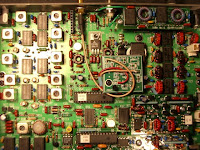


The above picture shows the Z10000-K2 daughter board mounted inside the K2 with output IF coaxial connected to the rear panel (top of picture). The input IF is taken from a convienient point on the noise blanker board connection posts.
I then contacted Tony Park for a K2 Softrock (4.898MHz IF). When finished, this was connected to the new IF output from the K2. The AF output from the softrock was then connected to my Delta 44 sound card. Rocky software then uses the sound card inputs to provide the panadapter.
I'm really pleased with the result and it makes a huge difference seeing signals round about you.
Tuesday, 28 October 2008
MM3T (CQWW Phone 08)
In preparation for CQWW I bought a BE102 mast support from Lynchy and 2x 5m 16swg ali poles from http://www.metals4u.co.uk/. The plan was to get a Cobweb (multi-band dipole) up at least 9m in the air for 20-15-10m. It was all installed a couple of weeks before the contest and I was getting good reports from the cobweb at around 9m over the ground. I lowered the antenna back down to ground level for safety so that it would be ready for CQWW phone 08.
I got home from work early on the Friday before the contest and put up the cobweb. It was up about 3 hours when the winds started to howl and I decided that since I wasn't using it through the night, I'd lower it and then raise it again on Saturday morning.
Saturday morning came and the winds started to rise yet again. I looked at the weather reports and found it was only going to get worse so rather than risk the antenna I left it at ground level. It was a fearsome gale, about force 7-8 and would definately have brought the antenna down. During all this time I was using my 80m doublet to keep the Qs going.
Sunday morning came and at last the wind died down so I went outside to put the antenna up. Never try and put up an antenna when you are tired! I made so many mistakes it took my twice as long as it usually did, but finally it went up and I hurried indoors to start the scores rolling properly on the higher bands.
I was on 15m and running the full legal limit when I got a knock at the door and a report that I was coming through computer speakers next door. Well, the linear was switched off and I spent the rest of the contest at 100w.
My contest turned out to be a disaster but lessons were learned for the CW leg which is the important one for me anyway.
1) I've ordered a thicker walled pole (10swg) for the bottom 5m mast section, to try and increase it's wind survival spec.
2) I've ordered a 12m spiderpole for a 40m vertical as my 40m score was pityful.
3) Try and get all antennas up before the contest and don't try and change things when I'm tired.
4) Remember to go to 20m early morning for the JA run and not just play on 80/40.
5) Order some ferrite rings for next door.
Hopefully CQWW CW will be better.
I got home from work early on the Friday before the contest and put up the cobweb. It was up about 3 hours when the winds started to howl and I decided that since I wasn't using it through the night, I'd lower it and then raise it again on Saturday morning.
Saturday morning came and the winds started to rise yet again. I looked at the weather reports and found it was only going to get worse so rather than risk the antenna I left it at ground level. It was a fearsome gale, about force 7-8 and would definately have brought the antenna down. During all this time I was using my 80m doublet to keep the Qs going.
Sunday morning came and at last the wind died down so I went outside to put the antenna up. Never try and put up an antenna when you are tired! I made so many mistakes it took my twice as long as it usually did, but finally it went up and I hurried indoors to start the scores rolling properly on the higher bands.
I was on 15m and running the full legal limit when I got a knock at the door and a report that I was coming through computer speakers next door. Well, the linear was switched off and I spent the rest of the contest at 100w.
My contest turned out to be a disaster but lessons were learned for the CW leg which is the important one for me anyway.
1) I've ordered a thicker walled pole (10swg) for the bottom 5m mast section, to try and increase it's wind survival spec.
2) I've ordered a 12m spiderpole for a 40m vertical as my 40m score was pityful.
3) Try and get all antennas up before the contest and don't try and change things when I'm tired.
4) Remember to go to 20m early morning for the JA run and not just play on 80/40.
5) Order some ferrite rings for next door.
Hopefully CQWW CW will be better.
Wednesday, 27 August 2008
One reason to buy an Elecraft K3
In the past I've bought radios and discovered that they were slightly deaf or off frequency. I found it frustrating that I didn't have the test equipment or the knowledge to align the radio and obtain the specified performance of when the radio was new. I'm not talking about a misused radio, just what happens to all radios through age due to high temperatures slowly changing the tolerances of components.
With the Elecraft K3 I can align the frequency readout at any time with an accurate source like RWM (9.996 or 14.996 MHz). This means that the radio will always be exactly on frequency independant of age. I can do this with no test equipment and in no time at all.
One of the causes of a radio going deaf is the IF wandering outwith the centre of the IF filter passband. With the Elecraft I can use it's internal test resources to measure the response of any roofing filter and I can work out if signals are still central to the filter passband and adjust the IF accordingly.
This means I should be able to maintain my radios performance to a higher degree for as long as I choose to hold on to the radio, without the need for specialist knowledge or elaborate/expensive test equipment.
Priceless!
With the Elecraft K3 I can align the frequency readout at any time with an accurate source like RWM (9.996 or 14.996 MHz). This means that the radio will always be exactly on frequency independant of age. I can do this with no test equipment and in no time at all.
One of the causes of a radio going deaf is the IF wandering outwith the centre of the IF filter passband. With the Elecraft I can use it's internal test resources to measure the response of any roofing filter and I can work out if signals are still central to the filter passband and adjust the IF accordingly.
This means I should be able to maintain my radios performance to a higher degree for as long as I choose to hold on to the radio, without the need for specialist knowledge or elaborate/expensive test equipment.
Priceless!
Subscribe to:
Posts (Atom)